 Driver Offer Advisor
How it works
From offer on screen to verdict in hand: what actually happens, in order.
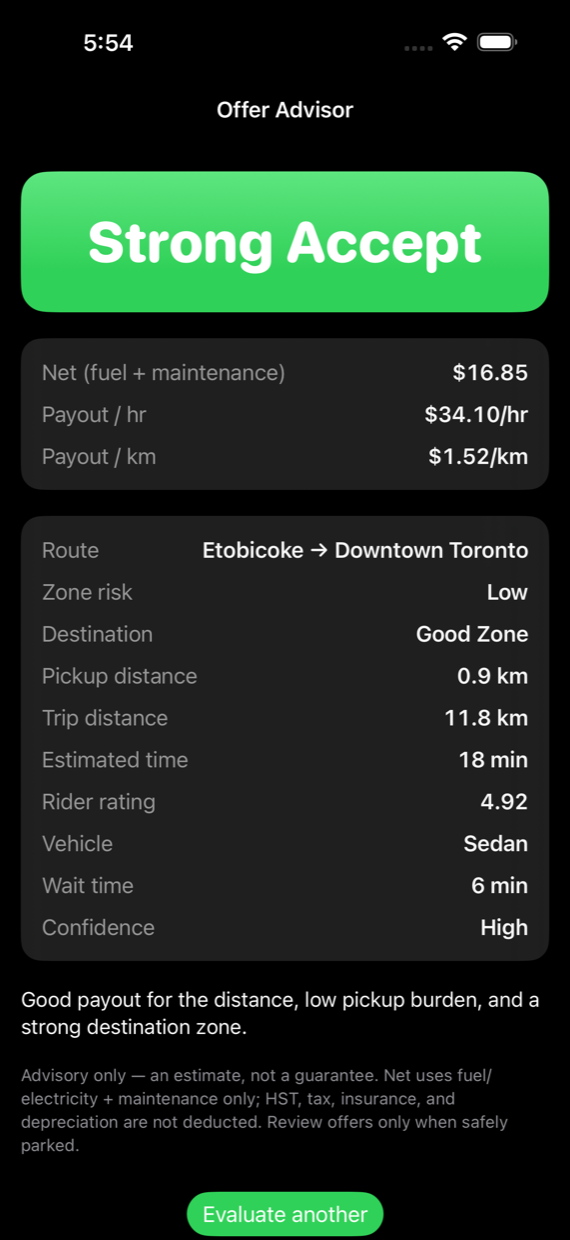
The one-sentence version: when an Uber offer is on your screen, Driver Offer Advisor reads the visible details on your device, scores the trip against your costs and your rules, and shows a verdict with the reason, all while the offer timer is still running.
Advisory only. It never taps buttons, never signs into Uber, and never decides for you.
1 · An offer appears, you trigger a check
Two ways to start an evaluation:
- Quick Button. One tap via the Evaluate Offer Shortcut. Most drivers put it on AssistiveTouch; Siri (“Hey Siri, evaluate offer”) and Back Tap work too. The check runs only when you ask for it.
- Auto Scan. Optional. Start a screen broadcast and the app watches for offer cards by itself while you drive. iOS shows the recording indicator the entire time, and you can stop it whenever you want.
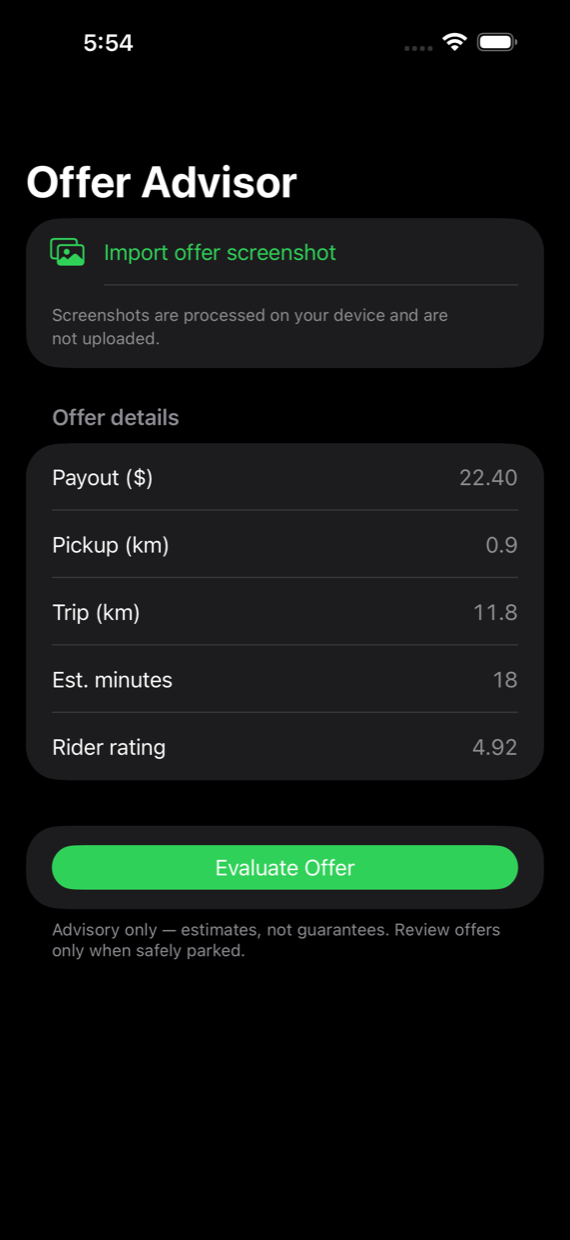
2 · The math you can’t do in a few seconds
The score isn’t just payout ÷ time. The app weighs what the offer card doesn’t say out loud:
- Net, not gross. Fuel/electricity and maintenance come off the payout before anything is judged. (HST, tax, insurance, and depreciation are deliberately not deducted, and the app says so on every result.)
- The whole trip. Pickup distance and wait time count against the offer, not just the paid kilometres.
- Where you end up. A great fare into a dead zone is a different trip than the same fare into a busy one. The app works anywhere in Canada; in the Greater Toronto Area it additionally applies local offer-pattern and rush-hour intelligence, and more cities get that next.
- Your rules. Your hourly floor, your required minimums, your preferences. The same offer can be a take for one driver and a skip for another.
Which apps it reads
- Uber rideshare. UberX and the other ride types, with the full verdict.
- Lyft. Scored by the same engine, the same costs and the same thresholds, so a Lyft trip counts in your dashboard exactly like an Uber one.
- Uber Package. Deliveries are priced by their own model rather than the rideshare one: whether the job covers its running costs comes first, then what it pays for the time.
- Restaurant Uber Eats: not yet. Merchant wait, tips and batched drops make it a different calculation, and a confident answer with nothing behind it is worse than none.
3 · The verdict shows its work
Every result comes with the reason in plain words. In the screenshot above: “Good payout for the distance, low pickup burden, and a strong destination zone.” If the app tells you to skip, it tells you why, so you can disagree with it intelligently. You always make the final call.
See it on a real shift
More clips on the videos page.
The thinking behind the verdict. The guides cover what a kilometre actually costs you, whether your acceptance rate matters, and how to read an offer in the seconds you get.
What you’ll set up after installing
Three one-time steps, guided inside the app (Capture Setup has the step-by-step and a tutorial video). Knowing them now means no surprises later:
- Add the Evaluate Offer Shortcut (one tap from the app).
- Pick your trigger. AssistiveTouch is the recommended one.
- If you want Auto Scan: allow the screen broadcast it asks for. That permission is what iOS requires for the app to see the offer card. The frames are read on your phone and discarded, as the privacy page explains.
Try it on your next shift.
Join the free beta →iPhone only · free during the pilot · how the beta works
Advisory only. Not affiliated with Uber or Lyft. No earnings are guaranteed. The app helps you read an offer, it doesn’t promise a result.